
Static vs Dynamic QR Codes: Which Should Your Business Use?
Every QR code is either static or dynamic, and the choice is made before you print — not after. Here's what actually differs, what each one costs you, and four questions that settle it for a real business use.
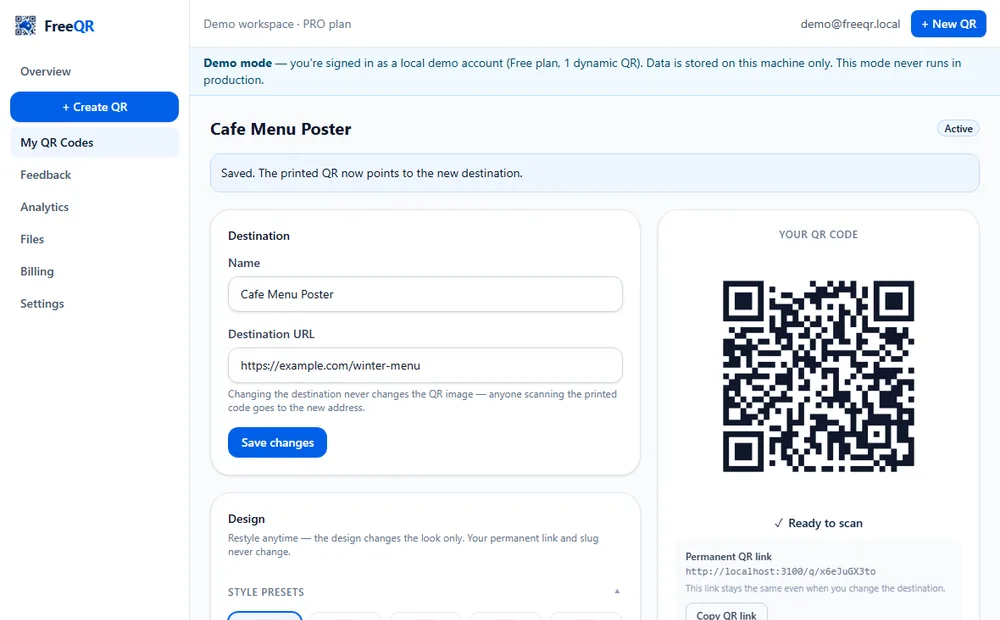
A QR code is a grid of squares that a phone camera decodes into data — defined by the international standard ISO/IEC 18004 and originally developed by Denso Wave. The pattern itself is never the interesting part. What matters for a business is what the pattern contains, because that decides whether you can ever change it, whether you can measure it, and what happens when something goes wrong after it's printed. That's the whole static-versus-dynamic question.
This is the decision guide. If you've already decided on dynamic and want the click-by-click setup, the dynamic QR walkthrough covers that with real screenshots.
The difference, in one sentence each
Static: your content — a web address, Wi-Fi details, a contact card, plain text — is written directly into the pattern. Whatever it says the day you generate it is what it says forever.
Dynamic: the pattern holds a short, permanent FreeQR link. When someone scans it, FreeQR looks up where that link currently points and sends them there — so you change the destination in your dashboard and every printed copy follows.
| Property | Static QR | Dynamic QR |
|---|---|---|
| What the printed pattern holds | Your actual content (URL, Wi-Fi details, contact card…) | A short, permanent FreeQR link |
| Change it after printing | No — never | Yes — edit the destination anytime |
| Scan analytics | None — no server is involved in a scan | Scans over time, unique visitors, countries, devices, browsers |
| Account needed | No | Yes, to manage the destination |
| Cost on FreeQR | Free and unlimited | First one free; more on a paid plan or a one-off lifetime code |
| Depends on a service | No — only on the destination existing | Yes — FreeQR resolves every scan |
What static gets right
Static codes are underrated. They need no account and no service in the middle — the phone reads the content straight out of the pattern — so they keep working for as long as the destination itself exists. On FreeQR they're free, unlimited and generated in your browser. And some content only makes sense static: a Wi-Fi QR code that joins a network, or a contact card a phone saves directly, works with no internet lookup at all.
The cost is total inflexibility. A typo, a moved page, a price change or a rebrand means a new code and a reprint of everything carrying the old one. And because nothing sits between the scan and the content, there is no way to know whether anyone scanned it.
What dynamic gets right — and what it costs
Dynamic codes turn the printed code into a fixed asset and the destination into the changeable part. Fix a mistake, swap this season's menu for next season's, point a product label at a revised manual — the printed material is untouched. Every scan is counted on the way through, so you can see scans over time, estimated unique visitors, countries, devices and browsers (the analytics guide explains what those numbers can and can't tell you). There's a quieter print benefit too: the code only ever encodes a short link, so its pattern stays simple however long the real destination is.
The honest trade-off is dependency. Every scan is a live lookup, so a dynamic code relies on the platform that issued it continuing to run, and you need an account to manage it. On FreeQR, codes are never deleted for stopping payment — your free code and any lifetime codes stay active, and subscription-backed codes beyond your plan pause until you upgrade — but it's still a dependency a static code doesn't have.
You can't convert after printing
Common business uses, and which fits
- Guest Wi-Fi — static. The network details are the content, and it works without an internet lookup. Reprint if you change the password. (See the Wi-Fi QR guide.)
- A one-off event flyer or handout — static is fine if the link is final and you don't need scan numbers.
- Menus, promotions and seasonal signage — dynamic. The same printed sign points at whatever is current.
- Product packaging and labels — dynamic. Packaging is often printed months before launch; the destination can be finalised late and updated for years.
- Manuals and documents — dynamic, so a revised PDF doesn't mean re-labelling (see the PDF QR guide).
- Vehicle signage, shopfront decals, equipment tags — dynamic. Anything expensive or awkward to physically replace.
- Anything you want to measure — dynamic is the only option; static codes can't report scans.
Four questions that settle it
Could the destination ever change?
If there's any realistic chance — a new page, a corrected detail, a different file — choose dynamic. Being wrong with static costs a full reprint.
Do you want to know how many people scanned it?
Static codes can't tell you. If the numbers matter, the answer is dynamic.
Is it expensive or awkward to replace?
Thousands of labels, a vehicle wrap, an engraved plate, a building decal — dynamic removes the most expensive failure.
Is the content genuinely permanent, or self-contained?
Wi-Fi details, a short-lived handout, or content that will truly never move are legitimate static jobs — simpler, free, and dependent on nothing.
Getting started
Static codes are free and unlimited with no account in the free QR code generator. For dynamic, every FreeQR account gets one free forever — editable destination, scan analytics, no expiry. Beyond that, Starter is A$4.99/month for 10 dynamic codes, or a single extra lifetime code is a one-off A$29; see current pricing for every plan. Whichever you pick, read printing QR codes that actually scan before the run.
Frequently asked questions
- What's the actual difference between a static and a dynamic QR code?
- A static QR code stores your content directly in its pattern, so it can never change. A dynamic QR code stores a short, permanent FreeQR link instead; FreeQR looks up the current destination each time it's scanned, so you can change where it points without touching the printed code.
- Can I turn a static QR code I've already printed into a dynamic one?
- No. A static code's content is fixed in the printed pattern, and FreeQR never stores static codes, so there's nothing to convert. FreeQR's homepage generator can start a new dynamic QR from the same content and design, but it encodes a different link, so it's a new image you'd need to print.
- Is a dynamic QR code worse for scanning?
- Usually the opposite. A dynamic code only ever encodes a short link, however long the real destination is, so its pattern stays simple — fewer, larger modules that tolerate small prints and rough surfaces better than a static code carrying a long URL.
- Is my first dynamic QR really free?
- Yes — every FreeQR account gets one dynamic QR free forever (it activates once you verify your email): editable destination, scan analytics, no expiry and no card required. Starter is A$4.99/month for 10 dynamic codes, or a single extra lifetime code is a one-off A$29.
- What happens to my dynamic QR codes if I stop paying?
- They're never deleted. Your free code and any lifetime codes stay active. Subscription-backed codes beyond what your plan then covers are paused — anyone scanning sees a 'currently paused' page — and reactivate as they were if you upgrade again.
- Can I change a dynamic QR from a website link to something else later?
- You can change the destination as often as you like, but a dynamic QR's type is fixed when you create it. In practice a website-type code can be pointed at any URL — a new page, a hosted PDF link, a booking form — which covers most changes of mind.